WAV → MIDI · PRACTICAL GUIDE
WAV to MIDI, with results you can check.
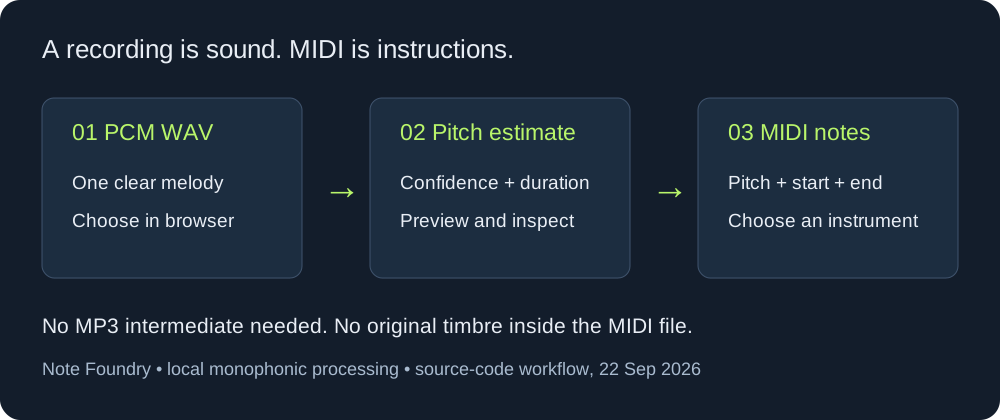
Choose a clear, single-note WAV recording in Note Foundry, click Convert to MIDI, preview the notes, then download the .mid file. You do not need to turn your WAV into MP3 first. The converter runs in your browser and accepts files up to 20 MB and 2 minutes.
Open the WAV converter ↗ See the test results ↓
Start with a melody, not a full mix
This version estimates one pitch at a time. A solo melody is the intended input; chords, drums and layered instruments can produce missing or incorrect notes. MIDI stores note events, not the sound of your WAV. Pick an instrument in your music software after importing the result.
- Choose your WAV in the converter. If decoding fails, try a standard PCM WAV.
- Click Convert to MIDI. Listen to the source, then preview the detected notes.
- Adjust confidence, minimum note length and transpose only as needed. Compare the beginning and end of each note with your recording.
- Download the MIDI and make detailed timing or note edits in your music software.
Our reproducible WAV tests
We generated four inputs rather than borrowing recordings: separated sine tones, short sine tones, silence, and two simultaneous tones. The downloadable files are mono PCM WAV at 11,025 samples per second and 16 bits per sample. Each tone has a short amplitude ramp to avoid an abrupt edge. All results below use confidence 0.80 and no transposition.
The test executes the same pitch-detection and MIDI-writing functions as this site. A test adapter supplies the generated samples at the detector’s internal rate; it does not measure browser decoding or resampling. This is a controlled test of this code version, not an accuracy benchmark for singing, guitar or commercial songs. The raw results include the source SHA-256 and exact timestamps.
| Generated input | Minimum length | Observed output |
|---|---|---|
| Four separated tones: MIDI 60, 64, 67, 72 | 100 ms | Four notes with those pitches; boundaries differ |
| Four 80 ms tones at the same pitches | 100 ms | Four notes, each about 160 ms |
| The same short-tone file | 40 ms | The same four notes and boundaries |
| Silence | 100 ms | No notes; download stays unavailable |
| MIDI 60 and 67 sounding together | 100 ms | One incorrect note: MIDI 48 |
Correct pitch does not mean correct timing
The separated-tone file is 2.8 seconds long. Each source tone lasts 0.5 seconds, with 0.15 seconds between tones. Although all four output pitches match, every detected start occurs before its generated source start. The table shows seconds, rounded to three decimals; the last column is detected start minus source start, multiplied by 1,000.
| MIDI pitch | Input start–end (s) | Output start–end (s) | Start difference (ms) |
|---|---|---|---|
| 60 | 0.150–0.650 | 0.080–0.659 | -70.2 |
| 64 | 0.800–1.300 | 0.718–1.297 | -81.6 |
| 67 | 1.450–1.950 | 1.377–1.956 | -73.1 |
| 72 | 2.100–2.600 | 2.015–2.614 | -84.6 |
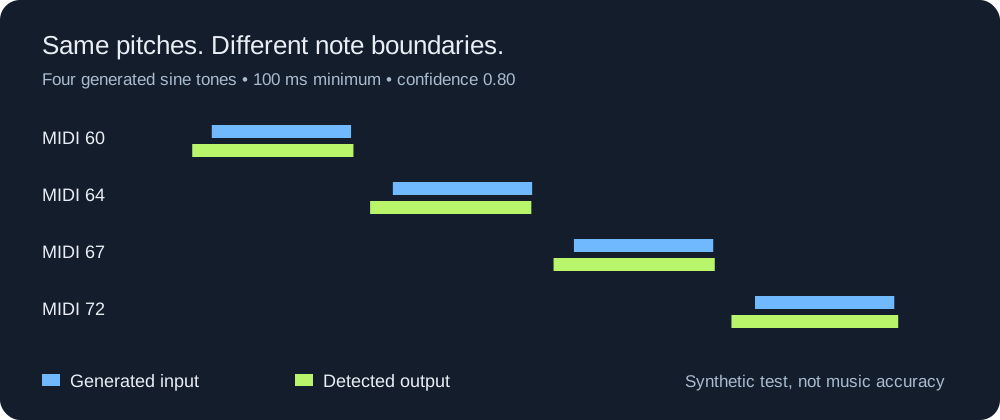
There is a concrete implementation reason to inspect boundaries. This detector examines a 1,024-sample window and labels the frame with the window’s start time. At 11,025 Hz that window spans 1,024 ÷ 11,025 × 1,000 = 92.88 ms. It advances by 220 samples, or 19.95 ms. A window can already contain part of a tone even when its timestamp precedes the tone’s onset. This explains how early labels can occur; it is not a promise of a fixed correction that works on every recording.
The minimum-length control filters detected runs
We expected the 80 ms input to help illustrate duration filtering. The measured result is more useful than that assumption: all four short tones survived the 100 ms setting because the detector produced runs of about 159.64 ms. Lowering the setting to 40 ms did not change those runs. The control compares the duration of a detected pitch run, not the known duration of the original sound. If a short note looks too long, moving this slider is not the same as trimming its end.
A two-note counterexample
The simultaneous-tone fixture contains MIDI pitches 60 and 67 from 0.15 to 1.25 seconds. The output contains MIDI 48 instead of either intended pair. Do not interpret a completed conversion or a nonempty download as proof that the transcription is correct. This version has no chord-separation stage; split or rerecord a single melody when that is the result you need. One synthetic failure does not measure how another product performs.
Download and repeat the experiment
- Separated-tone WAV and measured MIDI
- Short-tone WAV and measured MIDI at 100 ms
- Silence WAV — no MIDI emitted
- Simultaneous-tone WAV and incorrect detected MIDI
- Reproduction script, tested application source, and full JSON results
To reproduce the signal-path test, save the script and tested app.js into the same folder, then run node run-fixtures.cjs with Node.js. It writes generated files and results into a reproduced subfolder. For a browser check, choose one of the WAV files in the converter and use the listed settings. Browser resampling can change boundary details; compare the result rather than assuming it must be byte-identical to the adapter test.
Check the notes before choosing a new sound
Start by deciding what you want to reuse: a melody, every note of a chord, or the expression of a performance. These are different checks. A convincing instrument sound can make a rough transcription pleasant to hear without fixing missing pitches or early note starts.
- Melody: compare the detected pitches with the source before changing instruments. Then audition the same notes with the sound you actually want.
- Chords: inspect how many notes overlap. A single detected note is not a recovered chord; our two-tone fixture above demonstrates that failure explicitly.
- Expression: check bends and dynamics separately. The current MIDI writer emits note-on and note-off events with a fixed velocity of 90; it does not export pitch-bend events. Transpose moves note pitches but does not restore a continuous slide.
Keep the original WAV alongside the MIDI in your editor. Check note starts, note ends, and overlapping pitches as separate tasks. Changing the playback instrument happens after those checks; it cannot restore information the converter did not export.
WAV to MIDI questions
Should I convert WAV into MP3 first?
No intermediate conversion is needed here: the file selector accepts WAV directly. Converting to MP3 does not add the missing note events; pitch estimation still has to happen.
Why does the MIDI sound different?
The MIDI file contains pitches and timing, not the WAV’s voice, guitar tone or room sound. This converter’s preview uses a synthesized tone. The instrument you choose in your music software determines playback timbre.
Can it convert chords or an entire song?
It is intended for one note at a time. The two-tone test above is a reproducible failure case. This version does not separate instruments or export separate chord voices.
Why are very short notes still present?
Minimum note length applies to detected runs. As our short-tone test shows, a run can be longer than its source sound. Inspect the MIDI boundaries and trim them in your editor when needed.
Ready to check your own recording?
Open Note Foundry with a clear solo passage. If you are working in the opposite direction, use the MIDI to MP3 renderer. For local Python tool issues, see the existing troubleshooting guide.