MP3 to MIDI: The Bugs, Version Hell, and Workarounds Nobody Documents
TL;DR — What Actually Works (and What Will Waste Your Afternoon)
Converting MP3 to MIDI is not a "click a button" task. Anyone who tells you otherwise is selling something. Here's the honest landscape as of 2026:
- Basic Pitch (by Spotify) is the best free, open-source option for polyphonic audio-to-MIDI conversion. It supports WAV, MP3, FLAC, and more. But getting it installed will likely cost you hours fighting TensorFlow version conflicts.
- Omnizart is a Python library that handles multi-instrument transcription, vocal transcription, drum detection, and chord/beat tracking. It's powerful but fragile — it doesn't run on Apple Silicon Macs at all, and model checkpoint downloads fail silently.
- librosa is the foundational audio analysis library that both tools depend on, and it has a notorious numba/llvmlite version dependency chain that breaks in ways most tutorials don't mention.
- For a quick one-off, any browser-based converter will do — no install, no dependency hell. Just be aware that server-side tools impose file size limits.
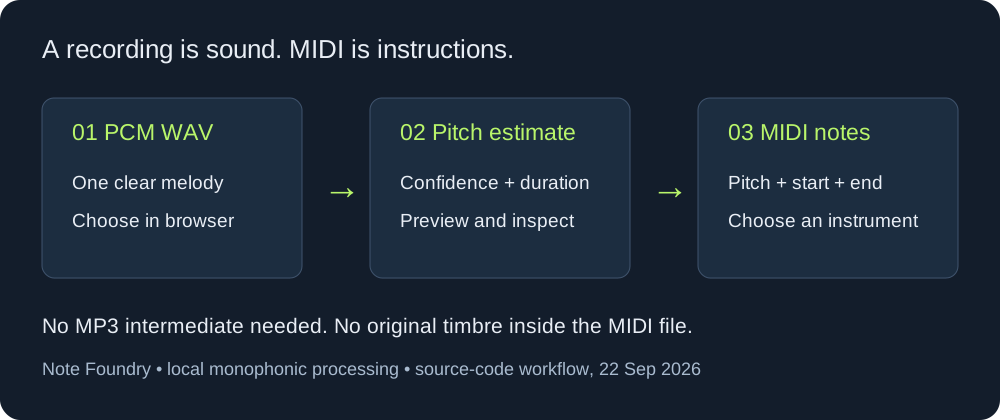
If you just need to capture a solo melody — a sung vocal, a clean lead — a browser-based tool like mp3frommidi.com does the job without installing anything: MP3 or WAV goes in, MIDI comes out, all processing stays in your browser. If you need to batch-process files, tune parameters, or integrate conversion into a pipeline, you'll need to install Basic Pitch or Omnizart locally — and that's where the pain begins. The rest of this article documents the specific errors, version combinations, and workarounds that people have hit and fixed, so you don't have to.
Pitfall #1: Basic Pitch + TensorFlow 2.16+ = '_UserObject' object has no attribute 'add_slot'
This is the single most common error people hit when installing Basic Pitch, and it's a TensorFlow version incompatibility — not a Basic Pitch bug. Multiple developers independently documented the same error and the same fix.
The Error
When you run basic-pitch output_dir/ audio.mp3 on a system with TensorFlow 2.16 or later, you get:
'_UserObject' object has no attribute 'add_slot'The model loads, but inference fails because TensorFlow 2.16 changed the SavedModel loading API. The add_slot method that Basic Pitch's ICASSP 2022 model relies on was removed or restructured in TF 2.16.
Tested Environments and Versions
| Component | Version | Result |
|---|---|---|
| Python | 3.11.6 | — |
| TensorFlow 2.15.1 | Works | Basic Pitch runs successfully |
| TensorFlow 2.16.1 | Fails | add_slot error |
| TensorFlow 2.18.0 | Fails | add_slot error |
| TensorFlow 2.15.0 | Works | Downgrade fix confirmed |
| OS | Windows 11 | Same error on Windows |
The Fix
Downgrade TensorFlow below 2.16:
pip install tensorflow==2.15.0Or install Basic Pitch with the TensorFlow extra, which pins compatible versions:
pip install 'basic-pitch[tf]'If you can't downgrade TF (e.g., other packages require 2.16+), a workaround is to disable GPU and force CPU-only inference:
import tensorflow as tf
tf.config.set_visible_devices([], 'GPU')
This doesn't fix the root cause, but in some environments it allows the model to load without hitting the add_slot path.
Why This Happens
TensorFlow 2.16 restructured the SavedModel loader. The add_slot attribute existed on optimizer objects in the Trackable hierarchy prior to 2.16. When Basic Pitch's pre-trained model was serialized (using TF ≤ 2.15), it captured references to this attribute. Loading that model under TF 2.16+ fails because the object reconstruction path changed.
This is not documented in Basic Pitch's official README as of 2026. The official install instructions still say pip install basic-pitch without any TF version warning.
Pitfall #2: librosa + numba = The Version Dependency Maze
Basic Pitch, Omnizart, and most Python audio-to-MIDI tools depend on librosa for audio feature extraction. librosa depends on numba for JIT compilation of DSP functions. numba depends on llvmlite for LLVM bindings. Get any one of these three versions wrong, and you get cryptic import errors.
The Three Most Common Errors
Error 1 — guvectorize signature missing:
TypeError: guvectorize() missing 1 required positional argument: 'signature'This happens when a new version of numba changed the guvectorize API, but your librosa version hasn't been updated to match. The function signature requirement changed, and librosa's internal calls break.
Error 2 — numba.decorators module missing:
ModuleNotFoundError: No module named 'numba.decorators'High versions of numba (e.g., 0.57.0) restructured their module layout. The numba.decorators submodule was removed or merged. Older librosa versions that import from numba.decorators directly will fail.
Error 3 — llvmlite binding attribute missing:
AttributeError: module 'llvmlite.binding.ffi' has no attribute 'register_lock_callback'This typically happens on Python 3.7+ when an older llvmlite version is installed. The register_lock_callback attribute was present in newer llvmlite but not in the version that numba pinned.
The Version Compatibility Matrix
These are tested combinations:
| Python | librosa | numba | llvmlite | Status |
|---|---|---|---|---|
| 3.6 | 0.7.0 | 0.48.0 | 0.31.0 | Works |
| 3.7 | 0.7.2 | 0.53.0 | 0.36.0 | Works |
| 3.6 | 0.6.0 | 0.48.0 | — | Works |
| Any | 0.9.x | 0.53.x – 0.56.x | — | Compatible |
| Any | 0.10.x | 0.57.x | — | Compatible |
| Any | 0.11.x+ | 0.58.x+ | — | Compatible |
| Any | 0.7.0 | 0.57.0 (too new) | — | Fails (Error 2) |
The Debugging Process (Real-World)
One developer documented their full debugging journey:
- Tried
pip install librosa→ failed withguvectorizeerror - Tried
conda install librosa→ also failed (conda resolved to incompatible versions) - Uninstalled numba entirely →
pip uninstall numba - Installed specific version →
pip install numba==0.48.0→ worked
Another developer on a fully offline Ubuntu machine (Python 3.6, no internet access) had to:
- Download wheel packages on an external machine:
pip download librosa==0.7.0 --python-version 3.6 --platform manylinux2014_x86_64 - Transfer to the intranet machine
- Install in strict order:
llvmlite→numba→librosa - Install order matters — if you install librosa first, pip will pull in a numba version that doesn't match the available llvmlite
The Desperate Hacks
When you absolutely cannot get the right versions (e.g., locked into a specific Python version on a legacy system), two nuclear options exist:
Hack 1 — Hybrid llvmlite copy:
- Install a high llvmlite (e.g., 0.36.0)
- Copy its
bindingdirectory to a backup location - Uninstall the high version, install the "correct" version (0.31.0)
- Copy the
bindingdirectory back
This works but may introduce subtle runtime issues. Use only as a last resort.
Hack 2 — Modify librosa source code:
- Find librosa's install location:
pip show librosa - Edit
util/decorators.py - Comment out the numba-related code
This disables numba JIT compilation, making librosa dramatically slower, but it will import and run.
The Tsinghua Mirror Tip
For users in China (or anyone hitting PyPI rate limits), use the Tsinghua University mirror to download packages faster:
pip install librosa -i https://pypi.tuna.tsinghua.edu.cn/simplePitfall #3: Omnizart — The Tool That Doesn't Run on Apple Silicon
Omnizart is an attractive alternative — it's a Python toolbox that bundles multiple SOTA models for automatic music transcription (AMT). It supports piano, pop music, drums, vocals, chords, and beat tracking. But it has its own set of issues.
ARM MacOS: Hard Incompatibility
Omnizart does not run on Apple Silicon (M1/M2/M3) Macs. This is a limitation of its underlying dependency chain, not something you can fix with environment variables or Rosetta. Your options:
- Use an Intel Mac
- Use Linux
- Use Windows via WSL2
- Use Google Colab
Silent Model Download Failures
After installing Omnizart, you must download pre-trained model checkpoints:
omnizart download-checkpointsIf this fails (network issues, proxy, etc.), the error is often silent. You won't know until you try to transcribe and get:
Checkpoint file not found: .../variables/variables.data*The fix is to re-run the download command, optionally specifying a custom path:
omnizart download-checkpoints --output-path /your/custom/pathModel Selection Matters
Omnizart offers different models for different music types. Using the wrong model produces garbage output:
# For pop music
omnizart music transcribe audio.wav --model-type pop

# For classical piano
omnizart music transcribe audio.wav --model-type piano
If you're transcribing a guitar solo with the piano model, expect wildly inaccurate results. The model types are not interchangeable.
Debugging Tips
Enable verbose logging to diagnose issues:
export OMNIZART_LOG_LEVEL=DEBUG
omnizart music transcribe audio.wav
Check system dependencies before filing bug reports:
which ffmpeg
which fluidsynth
python -c "import tensorflow as tf; print(tf.__version__)"
Pitfall #4: Conversion Quality Issues That Aren't Bugs
Even when your tools install and run correctly, the MIDI output can be wrong in ways that feel like bugs but are actually algorithmic limitations. These issues come from real-world debugging experience.
BPM Doubling
A 70 BPM song gets transcribed as 140 BPM. This is a classic pitch-tracking failure mode: the algorithm detects note onsets at twice the actual rate, or the tempo estimation picks the doubled BPM because the note density pattern repeats at half the actual period.
Fix: Always verify the output BPM against the source. If it's exactly double, halve it in your DAW. If it's exactly half, double it. This is a known limitation of automatic tempo estimation, not something you can fix by tuning parameters.
Don't Remove Silence Before Conversion
It's tempting to trim leading silence or quiet passages from your audio file before running it through a converter. Don't. Removing silence changes the time base of the audio relative to the original recording, which means your MIDI notes will be offset from where they should be. If you later try to align the MIDI with the original audio (for mixing, overdubbing, or synchronization), everything will be misaligned.
Don't Over-Quantize
After conversion, your DAW's quantize function will offer to snap MIDI notes to a grid. Resist the urge to quantize at 100% strength. Over-quantization destroys the natural timing variations (groove, swing, human feel) that the converter actually captured correctly. Start with 30-50% quantize strength and adjust by ear.
Parameter Tuning for Basic Pitch
Basic Pitch exposes several parameters that significantly affect output quality:
| Parameter | Default | What It Does | When to Adjust |
|---|---|---|---|
--onset-threshold | 0.5 | Note onset detection sensitivity | Lower for quiet notes; raise for noisy audio |
--frame-threshold | 0.3 | Minimum probability for note sustain | Lower = more notes (including false positives) |
--minimum-note-length | 127.70ms | Filters out notes shorter than this | Raise to eliminate noise artifacts |
--minimum-frequency | — | Lowest detectable pitch (Hz) | Set to limit range (e.g., 80 Hz for guitar) |
--maximum-frequency | — | Highest detectable pitch (Hz) | Set to limit range (e.g., 1200 Hz for vocals) |
If your MIDI output has too many spurious notes, raise --onset-threshold to 0.6-0.7 and --minimum-note-length to 200ms. If notes are being missed, lower --onset-threshold to 0.3-0.4.
Pitfall #5: Packaging Basic Pitch with PyInstaller
If you're building a desktop application that bundles Basic Pitch, you'll hit PyInstaller issues. One developer documented their experience on Windows with Python 3.11.15:
One-file mode (--onefile):
- Produces a single .exe
- Slower startup (unpacks to temp directory on every run)
- Model files may not be bundled correctly — you get
FileNotFoundErrorat runtime
One-directory mode (--onedir):
- Produces a folder with the .exe and dependencies
- Faster startup
- Model files are in the folder and load correctly
- Larger distribution size
The recommendation: use --onedir mode for Basic Pitch applications. The --onefile mode's temp-directory unpacking breaks TensorFlow's model loading path because relative paths to model assets resolve incorrectly.
Quick Reference: Installation Commands That Actually Work
Basic Pitch (with TF version fix):
pip install 'basic-pitch[tf]'
# If you get the add_slot error:
pip install tensorflow==2.15.0
basic-pitch output_dir/ your_audio.mp3
librosa (with correct dependency order):
pip install llvmlite==0.31.0    # adjust for your Python version
pip install numba==0.48.0        # must match llvmlite
pip install librosa==0.7.0       # must match numba
Omnizart (on Linux/Intel Mac/WSL2):
sudo apt-get install libsndfile-dev fluidsynth ffmpeg
pip install numpy Cython
pip install omnizart
omnizart download-checkpoints
omnizart music transcribe audio.wav --model-type piano
If all of this sounds like more trouble than it's worth for a single file — it is. For a clear solo melody, a browser-based converter like mp3frommidi.com runs the conversion entirely on your device: MP3 or WAV in, MIDI out, nothing installed, nothing uploaded. It won't separate a full mix into instruments or recognize chords, but for one melody at a time, there's nothing to install and no version matrix to memorize.
Conversion questions from real-world checks
Why can MP3 to MIDI sound garbled or contain wrong notes?
Those descriptions usually point to an inference limit rather than a broken download. The browser detector follows one pitch at a time; dense mixes, overlapping notes, noise, and changing timbre can create extra events or miss the note you expected. Compare the MIDI piano roll with the source and edit the events before using the file.
Why can a garbled piano sound appear after conversion?
A MIDI file does not carry the original piano recording. It carries estimated note events, and the player supplies a piano or other instrument. If the estimated pitches or boundaries are wrong, playback can sound garbled even though the file opens normally. Try a clean solo passage and inspect the downloaded events.
Why can audio-to-MIDI timing sit behind the beat?
Onset detection is measured from analysis frames, so a detected note can start later or earlier than the source. Check the first event against the waveform or a metronome, then move or trim the MIDI notes in an editor. The converter does not promise beat-perfect timing.
Does audio to MIDI work better for melodic parts?
Yes, the tested path is intended for a clear monophonic melody: one audible pitch at a time. That makes the result easier to inspect than a chord, drum pattern, or full mix, but it still needs a note-by-note check after download.