AUDIO TO MIDI · TESTED WORKFLOW
Audio to MIDI: when a quiet melody produces no notes.
Choose a clear solo MP3 or WAV in Note Foundry, click Convert to MIDI, preview the notes, and download the MIDI. If a quiet recording produces no notes, lowering confidence may not help: this version checks signal energy before estimating pitch. Our downloadable level test shows the difference.
Open the audio converter ↗ Inspect the experiment ↓
Convert a recording into editable notes
The current tool accepts MP3 and WAV, up to 20 MB and two minutes. Processing stays in the browser. It estimates one pitch at a time; a full band recording or chord is not the same task as extracting a single melody. This page tests the effect of input level, not instrument separation.
- Select a recording with one clear note at a time.
- Convert it, then compare the source playback with the note preview.
- If nothing appears, check the source recording and try the known test files below before changing every control.
- Download a nonempty result and inspect pitches and timing in a MIDI editor. Choose an instrument there for playback.
The same note at eight input levels
We generated eight mono WAV files containing the same A4 tone, MIDI pitch 69, at 440 Hz. Each file lasts 1.4 seconds; the tone runs from 0.2 to 1.2 seconds. Only the peak amplitude changes, from 0.003 to 0.7 of full scale. The signal has a five-millisecond ramp at each edge and is quantized to 16-bit PCM at 11,025 samples per second. These are synthetic fixtures, not recordings of a singer or instrument.
We ran the current Note Foundry detector with confidence 0.80, minimum note length 100 ms and transpose zero. The 0.003, 0.006 and 0.007 inputs returned no notes. The 0.008, 0.01, 0.1, 0.35 and 0.7 inputs each returned one note at pitch 69. A further run of the 0.006 input at confidence 0.50 still returned no notes. The table links the actual generated input files and every MIDI file the test emitted.
| Peak amplitude | Nominal peak dBFS | Confidence | Output | Download |
|---|---|---|---|---|
| 0.003 | -50.46 | 0.80 | No notes | WAV · no MIDI emitted |
| 0.006 | -44.44 | 0.80 | No notes | WAV · no MIDI emitted |
| 0.007 | -43.10 | 0.80 | No notes | WAV · no MIDI emitted |
| 0.008 | -41.94 | 0.80 | 1 note: 69 | WAV · MIDI |
| 0.01 | -40.00 | 0.80 | 1 note: 69 | WAV · MIDI |
| 0.1 | -20.00 | 0.80 | 1 note: 69 | WAV · MIDI |
| 0.35 | -9.12 | 0.80 | 1 note: 69 | WAV · MIDI |
| 0.7 | -3.10 | 0.80 | 1 note: 69 | WAV · MIDI |
| 0.006 | -44.44 | 0.50 | No notes | WAV · no MIDI emitted |
The dBFS column is calculated as 20 × log10(the requested peak amplitude), with full scale equal to one. It is not a loudness measurement or a measured microphone level. Quantization and the positions of individual samples mean the actual peak can differ slightly from the requested amplitude. The original amplitude values, unrounded frame measurements and detected note events are included in results.json.
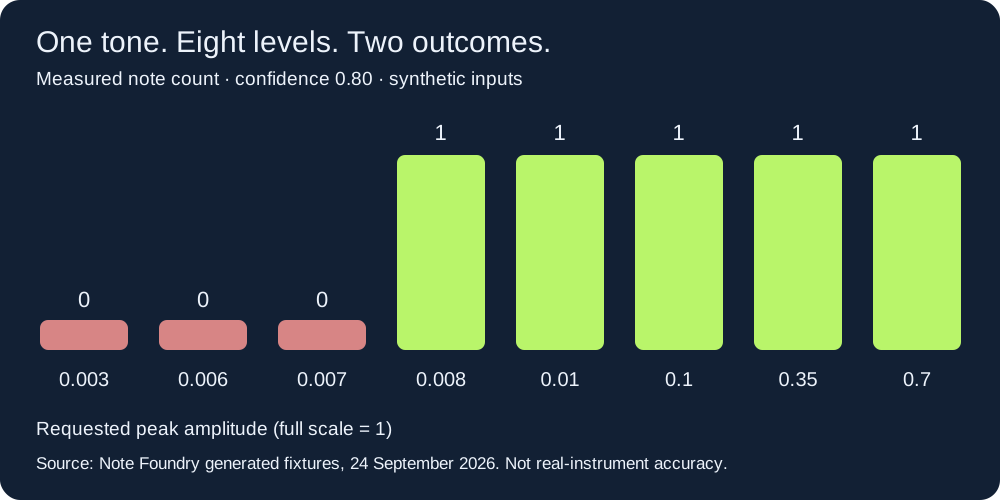
Why lowering confidence did not rescue the quiet file
In this source version, each analysis frame must have mean squared amplitude greater than 0.000025 before the pitch calculation runs. Mean squared amplitude here is the sum of the squared samples divided by the 1,024-sample window length. The confidence slider is applied later, when detected frames are grouped into notes. A frame rejected by the energy test has no pitch for the slider to recover.
The maximum measured frame mean square was 0.0000180541 for the 0.006 fixture and 0.0000245699 for the 0.007 fixture. Both are below the code's gate. The 0.008 fixture reached 0.0000320901 and produced a note. The deliberately repeated 0.006 run distinguishes the energy gate from the confidence control: moving confidence from 0.80 to 0.50 changed neither its samples nor its empty result.
For an ideal steady sine, mean square is approximately peak amplitude squared divided by two. Solving A²/2 = 0.000025 gives A ≈ 0.007071, or about −43.01 dBFS peak. That is a code-based explanatory estimate for this signal, not a recommended recording target. Real signals, edge ramps, finite windows and quantization differ. The measured bracket in this experiment is simpler: 0.007 failed and 0.008 passed.
More level did not preserve more expression
At amplitude 0.008, the detected note spans approximately 0.200–1.137 seconds. At 0.1 it spans 0.120–1.197 seconds, even though both source tones have the same 0.200–1.200-second boundaries. The 0.35 and 0.7 fixtures match the 0.1 fixture's detected boundaries. Increasing level changed which frames passed the gate; it did not turn this into an exact onset detector.
All emitted notes use velocity 90 because the current MIDI writer supplies that constant. The louder fixtures therefore do not become louder MIDI notes through velocity. This gives two separate checks for a useful result: whether a note was detected at all, and whether its timing and expression match your intended performance. This experiment establishes the first change and the timing differences; it does not test perceived musical quality.
Repeat the test
Save run-amplitudes.cjs and the tested app.js in the same folder. Run node run-amplitudes.cjs with Node.js. The script writes inputs, MIDI outputs and JSON into a reproduced folder. The JSON records the source SHA-256 so you can identify exactly which implementation was tested.
The adapter executes the site's pitch detector and MIDI writer with deterministic mono samples at their internal rate. It substitutes browser rendering and UI elements; it does not benchmark browser decoding or resampling. For a separate browser check, choose the downloadable WAV files in the live converter. Do not treat this synthetic experiment as an accuracy score for real recordings or other products.
A useful result is more than a successful download
Changing a recorded melody into a different instrument, recovering a chord, and preserving a bend are different goals. Start with the one you need. For a melody, check the note sequence first. For simultaneous notes, inspect whether multiple pitches actually exist. For expression, look for the relevant events instead of assuming an attractive preview retained them.
Here, a single pitch detector and fixed output velocity set clear limits. There is no chord separation or pitch-bend export. Changing the preview or playback instrument cannot add those missing events. Keep the source recording for comparison, and make any detailed note edits in your music software.
Audio to MIDI questions
Can I make the recording louder inside this converter?
There is no input-gain control in this version. The confidence slider is not a volume control. If the source is extremely quiet, adjust the file level in an audio editor, avoid clipping, then select the revised file and convert again. This experiment used clean generated tones; it does not establish that amplifying a noisy recording will improve its transcription.
Why can I hear the source but get no notes?
Hearing audio does not prove that its analysis frames pass this detector's energy and pitch checks. Compare a known working fixture with your recording. Our 0.006 file illustrates an energy-gate rejection even at the lower tested confidence.
Will a louder source make louder MIDI?
Not through velocity in this implementation: exported notes use velocity 90. Edit dynamics afterward if the performance needs them.
Which audio formats work here?
Select MP3 or WAV. Other formats are not accepted directly by the current file selector. For a WAV-specific workflow and a separate timing experiment, see WAV to MIDI.