Can an MP3 click track become MIDI clicks?
Yes, if the recording contains a clean, single-pulse click line; the MIDI still needs a tempo and instrument assignment after conversion.
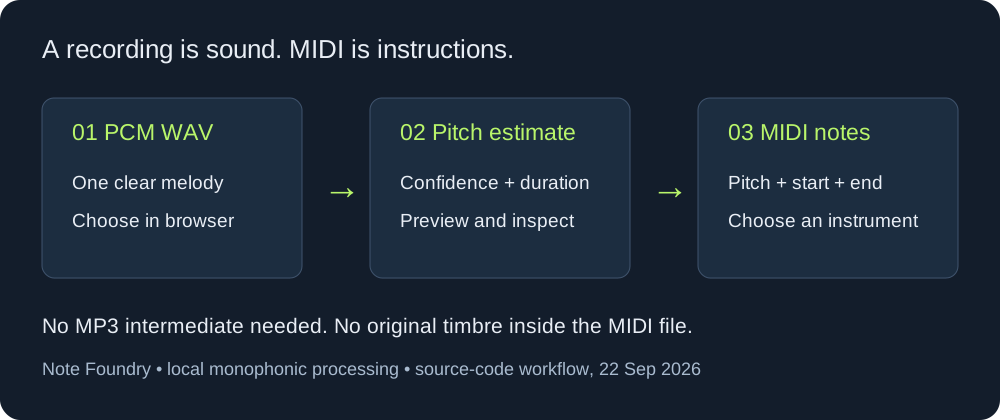
A click track is easier to test than a full mix because each pulse has one dominant event. The browser converter at Note Foundry accepts an MP3 or WAV file, detects a monophonic line locally, and exports MIDI. It does not accept a YouTube link, separate stems, or a mixed arrangement as a guaranteed click-track transcription.
A repeatable workflow
- Render the click track to an authorized MP3 or WAV file. Keep the click sound isolated from music and reverb.
- Open the converter, choose the file, and wait for the note list to finish. Download the MIDI only after the result appears.
- Open the MIDI in a DAW or notation editor. Set the tempo and choose a short percussion or metronome sound; MIDI carries note events, not audio.
What can go wrong
Clicks that overlap a backing track, contain accents with different timbres, or drift against the grid can create extra or missing events. A clean single-line test is the useful baseline. A full mixed MP3 is a different problem and should be checked event by event.
Answer for the real-world question
If the goal is MIDI clicks for a track with tempo changes, convert a short clean section first, inspect the event spacing, then repeat by section. A single export will not infer every tempo decision from a full re-recorded MP3.
FAQ
Will the MIDI sound like the original click?
No. MIDI stores timed note events. Choose the metronome or percussion sound in the software that plays the MIDI.
Can this page convert a full song into a perfect click map?
No. The browser path is a melody-oriented detector. Mixed material and timing changes require manual checking after export.