mp3frommidi.com · evidence-led route test
Sheet Music to MIDI Guide: what the measured routes actually reproduced
This page covers the sheet-music-to-MIDI intent, including music score, PDF, scan, photo, picture and image wording. The input was created for this test; it is not a copyrighted score.
Test matrix
| Input | Observed result | Output |
|---|---|---|
| Printed score PNG | Input SHA-256 differs; this route returned no MIDI in this run | 196 parsed note-on events; 0 matches, 196 extra, 4 missing; output SHA-256 CD8BBC565FEE5767F783BC0E78DD1D61F1CD6AA2BA1AA355729F595DEE56FA18 |
| Simulated scan PNG | Input SHA-256 differs; this route returned no MIDI in this run | 196 parsed note-on events; 0 matches, 196 extra, 4 missing; output SHA-256 CD8BBC565FEE5767F783BC0E78DD1D61F1CD6AA2BA1AA355729F595DEE56FA18 |
| Simulated phone-photo PNG | Input SHA-256 differs; this route returned no MIDI in this run | 196 parsed note-on events; 0 matches, 196 extra, 4 missing; output SHA-256 CD8BBC565FEE5767F783BC0E78DD1D61F1CD6AA2BA1AA355729F595DEE56FA18 |
Input fingerprints: printed-score.png C23AB001C00D660DBE8F66167E23749682EE21A369BDBD6F186847C20062B685; scanned-score.png 5F922D8707940FB6A372EC284765F4EB48FC280C0D6BA9831A036070AEB73513; phone-photo-simulated.png E2B8B5AED71B7C498A4B05DAB7D66B32BF0387B38746BC7218C755B7D7810D54. Output fingerprint for all three: CD8BBC565FEE5767F783BC0E78DD1D61F1CD6AA2BA1AA355729F595DEE56FA18.
Three-route comparison matrix
| Input | Image to MIDI | Lacuna | PureMIDI |
|---|---|---|---|
| Printed score PNG | 196 note-on events; output SHA-256 CD8BBC565FEE5767F783BC0E78DD1D61F1CD6AA2BA1AA355729F595DEE56FA18 | An internal error interrupted this task. Try again. (2026-10-16) — 未取得 MIDI | PureMIDI upload attempt reached “Opening the file picker...” but no file entered the control in the in-app browser (2026-10-16) — 未取得 MIDI |
| Simulated scan PNG | 196 note-on events; same output fingerprint | An internal error interrupted this task. Try again. (2026-10-16) — 未取得 MIDI | PureMIDI upload attempt reached “Opening the file picker...” but no file entered the control in the in-app browser (2026-10-16) — 未取得 MIDI |
| Simulated phone-photo PNG | 196 note-on events; same output fingerprint | An internal error interrupted this task. Try again. (2026-10-16) — 未取得 MIDI | PureMIDI upload attempt reached “Opening the file picker...” but no file entered the control in the in-app browser (2026-10-16) — 未取得 MIDI |
Route status
| Route | Access result | Output |
|---|---|---|
| Lacuna | The route returned its recorded status text; no MIDI was obtained | Not run; no MIDI output to parse |
| PureMIDI | PureMIDI upload attempt reached “Opening the file picker...” but no file entered the control in the in-app browser on 2026-10-16; no MIDI was obtained | Not run; no MIDI output to parse |
Reproduce the boundary check
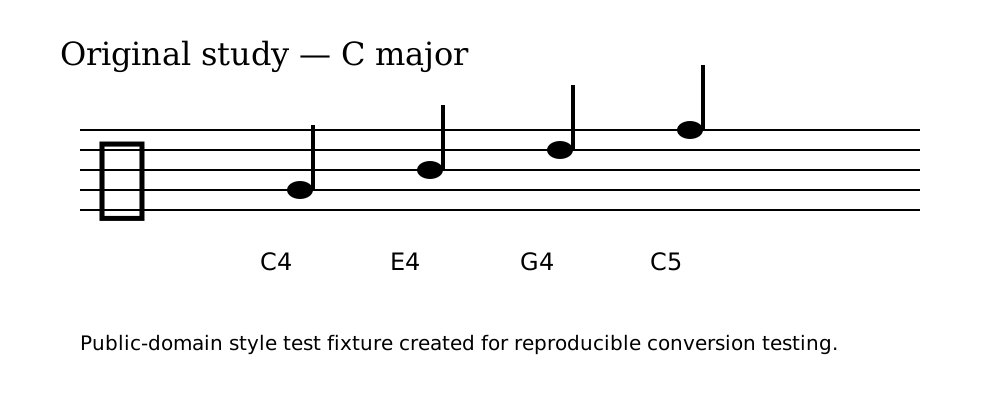
- Download the PNG fixture.
- Open Image to MIDI, choose the image, and click Generate MIDI.
- Download the result as image2midi-output.mid. The downloadable SVG source shows how the fixture was made.
What was actually free
Image to MIDI produced a downloadable MIDI file for this run. Lacuna returned the recorded internal-error text and no MIDI. PureMIDI upload attempt reached “Opening the file picker...” but no file entered the control in the in-app browser on 2026-10-16; no MIDI was obtained. No route result here is presented as an accuracy or success rate.
What this site does
The mp3frommidi.com converter is an audio-to-MIDI tool for recordings. It does not perform optical sheet-music recognition. The table above is a separate route test for sheet images.
Evidence files
Sheet music maker checks
Short answer: Check the input route, export format, and stated limits before treating a sheet music maker result as a faithful score.
How should I check a sheet music maker?
Record whether the source was typed notes, a scan, a photo, MIDI, MusicXML, or audio. Record the tool and plan state, export the result, and compare it with the source. Verify input format, output format, login, batch behavior, and limits on the exact tool page.
Sheet music creator: what this page does and does not do
A sheet music creator normally means a notation workspace that lets you enter or edit notes and export a score. This page tests a different handoff: it records what image-to-MIDI routes returned for a small fixture, while the site converter itself accepts audio recordings and returns MIDI note data. Use a notation editor for staff layout and final score editing.
For this route test, compare the input type, exported file, and stated limits on the exact tool page before treating any sheet music creator result as a faithful transcription.
Conclusion
This run found an input-consumption boundary: three distinct PNG fingerprints produced one identical MIDI fingerprint. It does not establish an accuracy rate or success rate.